
Giving a child their first phone is a big decision. Most parents worry about what kids might see online, who can contact them, and how much time they spend on a screen. Troomi was built to ease those worries, and the Troomi parent portal is where parents control the whole experience.
This guide explains what the portal is, how to get started, and how to use its main features so your child’s phone stays safe and age-appropriate.
What Is the Troomi Parent Portal?
The Troomi parent portal is an online dashboard where parents manage their child’s Troomi phone. Instead of handing over a regular smartphone and hoping for the best, you decide which content, apps, and contacts your child can access.
Think of it as a control center. You set the rules once and adjust them whenever your child grows or your family’s needs change.
How to Log In to the Troomi Parent Portal
Getting started is simple:
- Go to the official Troomi website.
- Select the parent or account login option.
- Enter your account email and password.
- Open your dashboard and choose your child’s profile.
If you forget your password, use the reset option on the login page. Always use the official Troomi website, and never share your login details with anyone, including your child.
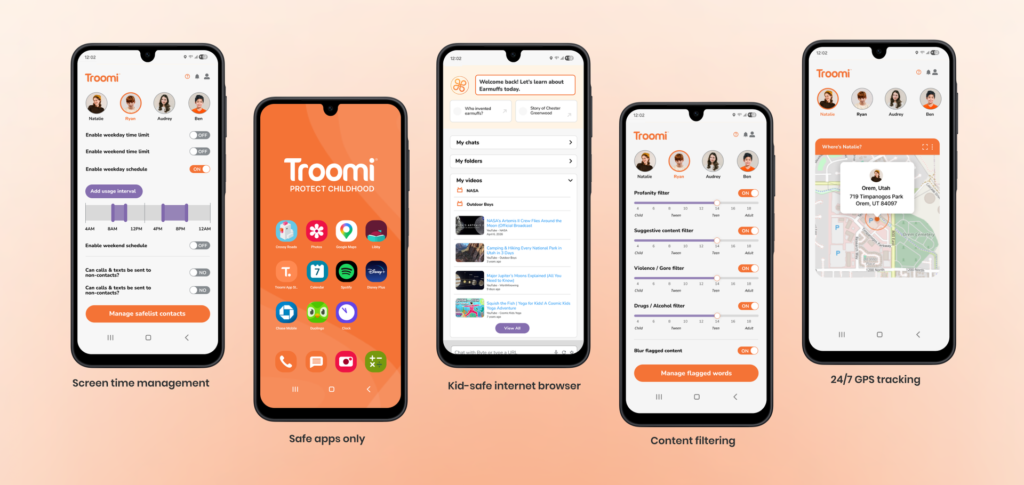
Key Features Parents Can Manage
Features can change as Troomi updates its service, so check your dashboard for the latest options. In general, parents can manage the following.
Content and Media
You choose what your child can watch, listen to, and read. This lets you filter out anything that doesn’t match your family’s values or your child’s age.
Apps
Rather than leaving the app store open, you can approve the apps your child uses. This helps prevent kids from downloading something unsuitable.
Contacts and Messaging
You can control who your child can call and text. Keeping the contact list limited to family and trusted friends reduces the risk of unwanted communication.
Screen Time and Usage
Many parents use the portal to keep an eye on how the phone is being used. This makes it easier to build healthy habits, such as no phone at bedtime or during homework.
Tips for Getting the Most from the Portal
- Start strict, then loosen. It’s easier to add permissions as your child shows responsibility than to take them away.
- Review settings regularly. A setup that suits a 9-year-old may not suit them at 12.
- Talk with your child. Explain why certain rules exist so they understand them instead of feeling controlled.
- Check in often. Look at your dashboard every few weeks to make sure everything still fits your family.
Who Is the Troomi Parent Portal Best For?
It works best for parents who want their child to have a phone without full, unrestricted internet access. It suits families with younger children and pre-teens who need to stay in touch but aren’t ready for the open internet and social media.
Final Thoughts
The Troomi parent portal gives parents control, flexibility, and peace of mind. By learning how to log in, set up permissions, and review them regularly, you can help your child use technology safely while they build good habits.
If you’re considering Troomi for your family, explore the portal and adjust the settings to match your child’s age and maturity.